How to Reset Your Yahoo Mail Password
Reset a forgotten Yahoo password with Sign-in Helper, understand recovery limitations, review app passwords and find the right route for provider-managed accounts.
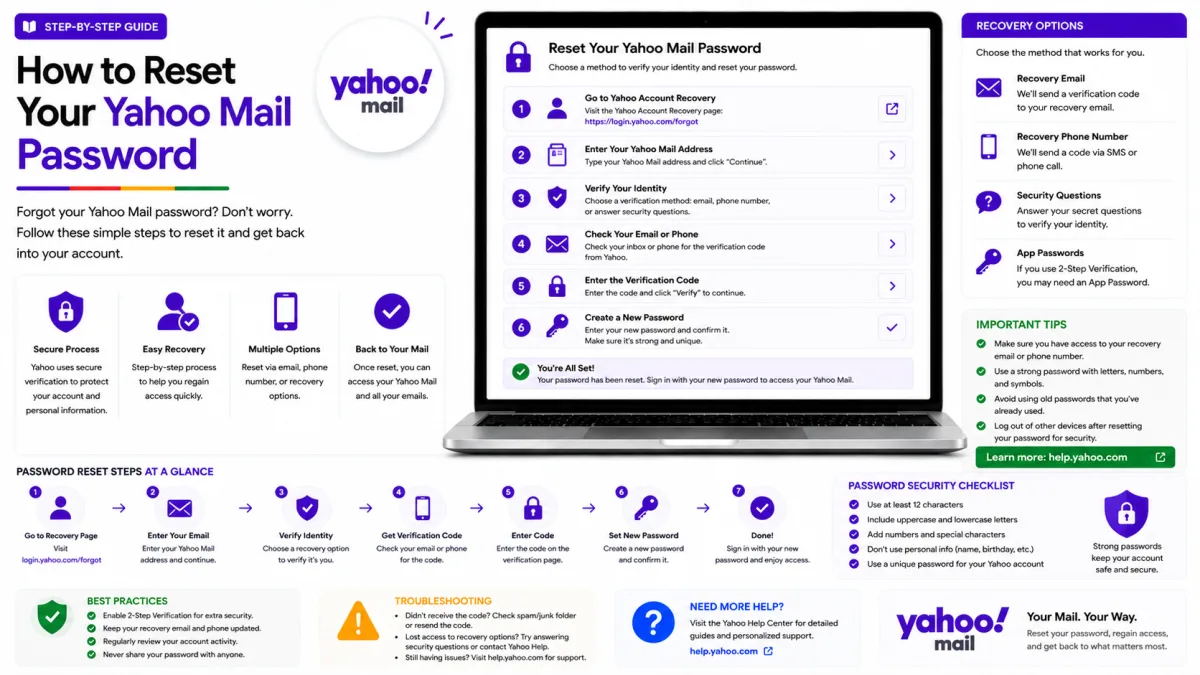
How straightforward this is depends on what you still have access to. If you know your current password and simply want a new one, it takes a minute. If you are locked out, Yahoo's Sign-in Helper is the route — and there is one situation, covered below, where none of this applies to you at all.
First: who manages your email account?
Some internet, mobile and television providers use Yahoo’s mail platform while continuing to manage their customers’ passwords themselves. If your email address was supplied by a company such as an internet or mobile provider, begin with that company’s account-recovery page.
Examples can include addresses associated with AT&T, BT, Sky, Rogers and other Yahoo-supported partners. The provider and recovery process vary, so use the organisation named in your email address or service agreement rather than assuming Yahoo controls the password.
If your address ends in @yahoo.com, @ymail.com or @rocketmail.com, use Yahoo’s Sign-in Helper as described below.
If you know your current password
On a computer
Go to your Yahoo Account Info page.
Open Account Security.
Select Change password.
Enter and confirm your new password, then continue.
In the Yahoo Mail app
Tap your profile icon.
Tap Manage Accounts, then your account.
Choose the option to change your password.
Useful to know: if you are still signed in on your phone but have forgotten the password, you can change it from the app without going through recovery at all. People often reach for Sign-in Helper when a device they are already signed into would have solved it in thirty seconds.
If you are locked out
Yahoo’s Sign-in Helper handles forgotten passwords and forgotten Yahoo IDs.
Open Yahoo’s Sign-in Helper.
Enter your Yahoo email address, recovery email address or recovery phone number.
Select an available verification method.
Enter the code or follow the verification link Yahoo sends.
Follow the remaining instructions to recover access or create a new password.
Yahoo may not show every recovery method on every attempt. The options depend on the recovery information attached to the account and Yahoo’s security checks.
Use a device, browser and location you normally use for Yahoo whenever possible. Avoid using a VPN during recovery because an unfamiliar connection may trigger additional verification.
Why your options differ from someone else's
This confuses people, and it is deliberate rather than a fault.
Yahoo does not show every recovery option to everyone. It decides which to display based on factors including where you are signing in from and what recovery information is on the account. Two people following identical steps can see different choices, and the same person can see different choices on different days.
The practical consequence: attempt recovery from a device and location you normally use. A familiar computer on your home connection is materially more likely to be offered useful options than a borrowed laptop on a public network or a VPN. If you are seeing very few options, changing where you are trying from is worth more than trying repeatedly from the same place.
If you have no recovery phone or email
Yahoo recovery normally depends on a verified recovery phone number or recovery email address.
Open Sign-in Helper and follow every option Yahoo offers. If you are still signed in on another trusted device, use that device to review and update your recovery information before signing out.
Yahoo no longer uses old account security questions for recovery. If Sign-in Helper cannot offer a verification method and you are not signed in anywhere else, recovery may not be possible.
Do not pay an unofficial service that claims it can bypass Yahoo’s verification. No third party can legitimately override Yahoo’s account-recovery checks.
Yahoo support, and the scams around it
Yahoo may offer paid support in certain locations and for certain products. Always begin at Yahoo’s official Help website rather than calling a number copied from a search result, forum, social-media post or unrelated website.
Be especially cautious of anyone who asks you to install remote-access software, make a payment through gift cards or cryptocurrency, or disclose a verification code.
Never give a Yahoo verification code to another person. A legitimate support representative does not need the code sent to you to take control of your account.
Use Yahoo Help to find whatever support options are currently available for your account and location.
After you reset
Check your app passwords
Yahoo app passwords remain active even after you change your main account password. Changing the Yahoo password alone does not revoke access previously granted through an app password.
If you reset the password because you suspect that someone accessed your account, open Account Security and review every app password under External connections. Delete any entry you do not recognise and revoke passwords for devices or applications you no longer use.
A deleted app password immediately stops working. Generate a new one only for an application you still trust and need.
Review current sign-ins, connected applications and app passwords. Remove anything you do not recognise or no longer use.
Tidy up your recovery details
While you are in there, and while you still can:
Confirm your recovery phone number is one you still control. An old number is the single most common reason recovery fails later.
Add a recovery email address if you do not have one, on an account you will keep.
Consider two-step verification. Note that Yahoo treats it as an alternative to Account Key rather than an addition, so you cannot have both.
Recovery is decided by what is in place before anything goes wrong. Five minutes now is worth considerably more than any amount of effort later.
Official Yahoo sources
Enquiries
Frequently asked questions
Why does Yahoo show different recovery options each time?
Yahoo decides which to display based on where you are signing in from and what recovery details are on the account. Trying from a familiar device and location often produces more options.
Can I reset my Yahoo password without my phone or recovery email?
Use Yahoo’s Sign-in Helper to see which verification methods are available. If you are still signed in on another trusted device, use it to update your recovery information. Yahoo no longer uses old security questions, and recovery may not be possible if you cannot access any verified recovery method.
My email is from BT, Sky or AT&T. Can I reset it through Yahoo?
Not necessarily. Some providers use Yahoo’s mail platform but manage their customers’ passwords separately. If your email address was supplied by an internet, mobile or television provider, begin with that provider’s official account-recovery page.
Does Yahoo have phone support?
Yahoo offers a paid premium support option through its own site. Any support number found on a third-party page is a scam.
Do Yahoo app passwords stop working when I change my password?
No. Yahoo says app passwords remain active after the main account password changes. To revoke one, open Yahoo Account Security and manually delete it under External connections. If the password was reset because of suspicious activity, review and remove any app passwords you do not recognise.
Next delivery
Keep reading
Yahoo Mail Security
Yahoo Mail Security: 2FA and App Passwords
Secure Yahoo Mail with two-step verification, Account Key, security keys and app passwords for older or manually configured applications.
6 min read
Yahoo Mail Troubleshooting
Yahoo Mail Not Working? Common Fixes
Fix Yahoo Mail problems involving missing messages, sending failures, storage, filters, Apple Mail, browser loading and device synchronisation.
7 min read
Yahoo Mail Login
How to Log In to Yahoo Mail
Sign in to Yahoo Mail on a computer, Android or iPhone, use Account Key and passkeys, and fix verification or mail-client authentication problems.
7 min read
Yahoo Mail Sign Up
How to Create a Yahoo Mail Account
Create a Yahoo Mail account, choose a permanent address, verify your mobile number, configure recovery and understand disposable addresses.
6 min read
Yahoo Mail IMAP
Yahoo Mail IMAP Settings
Use Yahoo Mail IMAP in Outlook, Apple Mail or Thunderbird with the correct server, port, encryption and supported authentication method.
6 min read
Yahoo Mail SMTP
Yahoo Mail SMTP Settings
Use Yahoo Mail SMTP with the correct server, ports, encryption and authentication, and fix sending problems in clients, printers and scripts.
6 min read