Yahoo Mail SMTP Settings
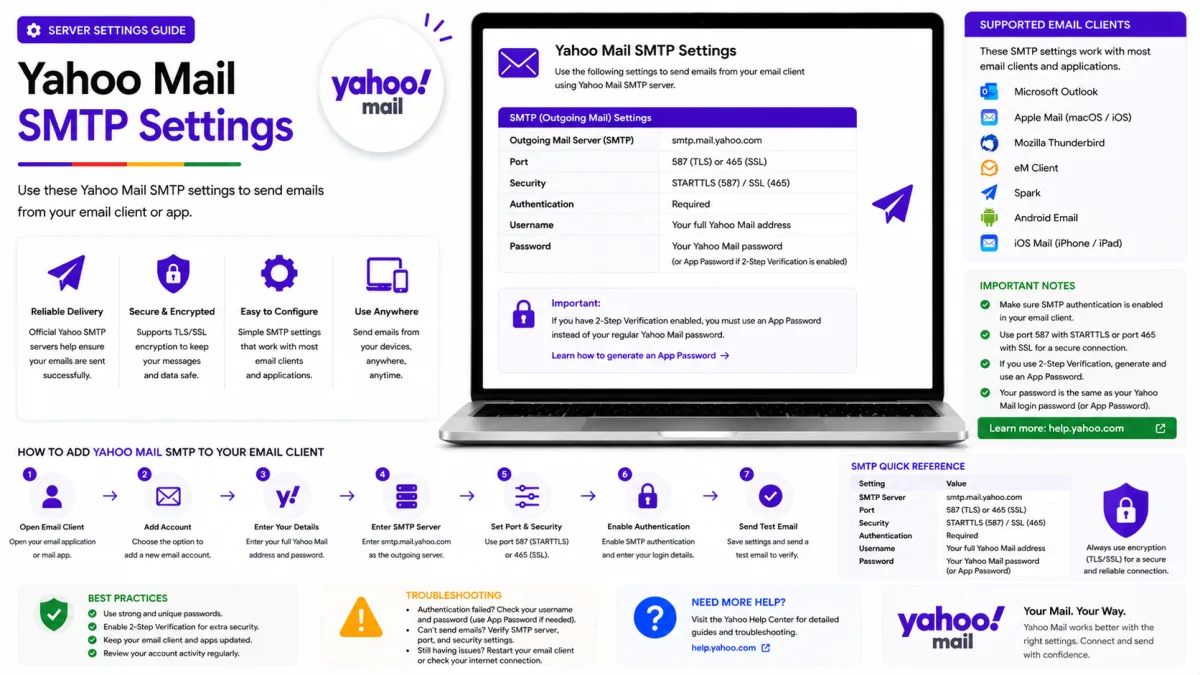
Use Yahoo Mail SMTP with the correct server, ports, encryption and authentication, and fix sending problems in clients, printers and scripts.
Server settings
Yahoo Mail
- IMAP incoming SSL/TLS
- SMTP outgoing SSL/TLS
- POP3 download SSL/TLS
imap.mail.yahoo.com
port 993
smtp.mail.yahoo.com
port 465
pop.mail.yahoo.com
port 995
- App password
- May be required for older or manually configured apps, Account Key and two-step verification
- Alt SMTP port
- 587 with STARTTLS
SMTP is what your mail client, printer or script uses to send through Yahoo. It is configured separately from the incoming connection, which is why an account can receive perfectly while every outgoing message sits in the outbox — only one half is wrong, and it is usually this one.
Yahoo Mail SMTP settings
Setting | Value |
|---|---|
Server |
|
Alternative port | 587 with STARTTLS |
Recommended port | 465 with SSL/TLS |
Encryption | Required |
Authentication | Required |
Username | Your complete Yahoo email address |
Password | Yahoo sign-in when supported; otherwise an app password when required |
If your client has a separate "outgoing server requires authentication" checkbox, tick it. Older software leaves it unticked by default, on the long-dead assumption that anyone on the network can be trusted — and the resulting failure looks nothing like an authentication problem.
For incoming mail, see our IMAP settings guide, or the combined settings guide for everything on one page.
Choose the correct authentication method
When a current mail application offers Yahoo or “Sign in with Yahoo,” use that option first. The application should open Yahoo’s official sign-in page and complete authentication without storing your main password directly.
An app password may be required when:
Yahoo Account Key is enabled.
Two-step verification is enabled.
An older application cannot open Yahoo’s sign-in page.
A printer, scanner or script supports only manual SMTP authentication.
You are manually configuring an application that rejects your normal password.
To create an app password:
Open Yahoo Account Security.
Find External connections.
Select Create app password.
Enter a name identifying the application or device.
Select Generate password.
Enter the generated code in the SMTP password field.
Avoid copying spaces before or after the generated code. Create a separate app password for each application or device.
Choosing a port
Yahoo documents both, so either is correct — what matters is matching the encryption:
Port 465 with SSL/TLS — encrypted from the first byte.
Port 587 with STARTTLS — opens unencrypted and upgrades immediately, before any credentials are exchanged.
Both are secure. If one refuses to connect, try the other before assuming the credentials are at fault — some clients handle one more gracefully than the other, and switching resolves a surprising number of stubborn cases.
Port 25 is primarily used for server-to-server mail delivery and is not recommended for a normal Yahoo Mail client. Many consumer internet providers, mobile networks, workplaces and public networks block it to reduce spam. Use port 465 or 587 instead.
When mail will not send
Check these settings in order:
Confirm that the server is
smtp.mail.yahoo.com.Use port 465 with SSL/TLS or port 587 with STARTTLS.
Confirm that outgoing-server authentication is enabled.
Enter your complete Yahoo email address as the username.
Use Yahoo’s browser-based sign-in when the application supports it.
If Account Key or two-step verification is enabled and the application uses manual authentication, try an app password.
Remove any spaces accidentally copied with the app password.
Update the mail application and operating system.
Try another supported SMTP port.
Try another network if the connection times out.
If Yahoo Mail works in a browser but SMTP fails in only one application, the problem is normally that application’s authentication, port, encryption or network connection.
Printers, scanners and other devices
Printers, scanners, network-storage devices and older monitoring systems normally cannot open Yahoo’s browser-based sign-in page. These devices usually require an app password for SMTP authentication.
Create a separate app password for each device and name it clearly, such as “office scanner” or “home printer.” If the device is replaced or no longer used, delete its app password from Yahoo Account Security.
Changing your main Yahoo password does not automatically invalidate existing app passwords. If you changed the password because of suspicious activity, review and manually delete app passwords you do not recognise.
Using Yahoo SMTP for scripts and automation
Yahoo SMTP can work for a personal script, home server or small project sending occasional alerts. A manually configured script will normally require an app password because it cannot complete Yahoo’s browser-based sign-in process.
Yahoo Mail is not designed for newsletters, marketing campaigns, busy website contact forms or high-volume application email. Using a personal mailbox for automated volume can trigger sending restrictions and place the mailbox itself at risk.
Use a dedicated transactional email provider when email delivery is important to a website, business or application.
Reasonable: a personal script sending you occasional alerts. A home server emailing you when a backup finishes. A hobby project notifying a handful of people.
A bad idea: anything sending to people who did not ask for it, a contact form on a busy site, a newsletter, or anything sending in volume. Yahoo caps how much an account may send in order to contain compromised accounts, and those limits apply to SMTP exactly as they do to the web interface.
The consequence of crossing that line is not just a failed send. A personal mailbox suspended for bulk sending takes your own correspondence down with it — the account you actually rely on. A dedicated transactional sending service is built for volume, handles deliverability properly, and fails in isolation when something goes wrong.
If your project has outgrown occasional alerts, that is the point to move it off a personal mailbox rather than the point to look for a workaround.
Yahoo Mail sending limits
Yahoo limits the number of messages and recipients that an account can send at one time. Yahoo does not publish the exact limits because they are part of its anti-spam controls.
If Yahoo reports that a sending limit has been reached:
Stop sending and wait before trying again.
Do not repeatedly retry the same messages.
Check Sent mail and recent account activity for messages you did not send.
Change the password and review app passwords if the activity looks suspicious.
Reduce the number of recipients and the frequency of future messages.
The restriction is generally temporary, but Yahoo does not guarantee a specific recovery time for every account. Move newsletters and automated application mail to a dedicated sending service instead of attempting to work around Yahoo’s limits.
Official Yahoo sources
Enquiries
Frequently asked questions
What is Yahoo's SMTP server?
Yahoo Mail’s outgoing server is smtp.mail.yahoo.com. Use port 465 with SSL/TLS or port 587 with STARTTLS. Authentication is required, and the username is your complete Yahoo email address.
Should I use port 465 or 587?
Both are supported. Use port 465 with SSL/TLS or port 587 with STARTTLS. If one port is blocked or fails in your application, try the other while keeping the correct encryption method.
Why does Yahoo reject my password when sending?
Use Yahoo or “Sign in with Yahoo” when the application supports it. If the application uses manual authentication, Yahoo Account Key, two-step verification or an older application may require an app password from Yahoo Account Security.
Can I use Yahoo SMTP for my website's contact form?
It can work for a low-volume personal project, but Yahoo Mail is not designed for production website email. A transactional email provider is more reliable for contact forms, account notifications and automated messages.
How many emails can I send through Yahoo Mail?
Yahoo does not publish an exact universal sending limit. Limits can apply to both the number of messages and recipients, and exceeding them can temporarily prevent further sending.
Next delivery
Keep reading
Yahoo Mail Security
Yahoo Mail Security: 2FA and App Passwords
Secure Yahoo Mail with two-step verification, Account Key, security keys and app passwords for older or manually configured applications.
6 min read
Yahoo Mail Password Reset
How to Reset Your Yahoo Mail Password
Reset a forgotten Yahoo password with Sign-in Helper, understand recovery limitations, review app passwords and find the right route for provider-managed accounts.
5 min read
Yahoo Mail Troubleshooting
Yahoo Mail Not Working? Common Fixes
Fix Yahoo Mail problems involving missing messages, sending failures, storage, filters, Apple Mail, browser loading and device synchronisation.
7 min read
Yahoo Mail Login
How to Log In to Yahoo Mail
Sign in to Yahoo Mail on a computer, Android or iPhone, use Account Key and passkeys, and fix verification or mail-client authentication problems.
7 min read
Yahoo Mail Sign Up
How to Create a Yahoo Mail Account
Create a Yahoo Mail account, choose a permanent address, verify your mobile number, configure recovery and understand disposable addresses.
6 min read
Yahoo Mail IMAP
Yahoo Mail IMAP Settings
Use Yahoo Mail IMAP in Outlook, Apple Mail or Thunderbird with the correct server, port, encryption and supported authentication method.
6 min read