Yahoo Mail Security: 2FA and App Passwords
Secure Yahoo Mail with two-step verification, Account Key, security keys and app passwords for older or manually configured applications.
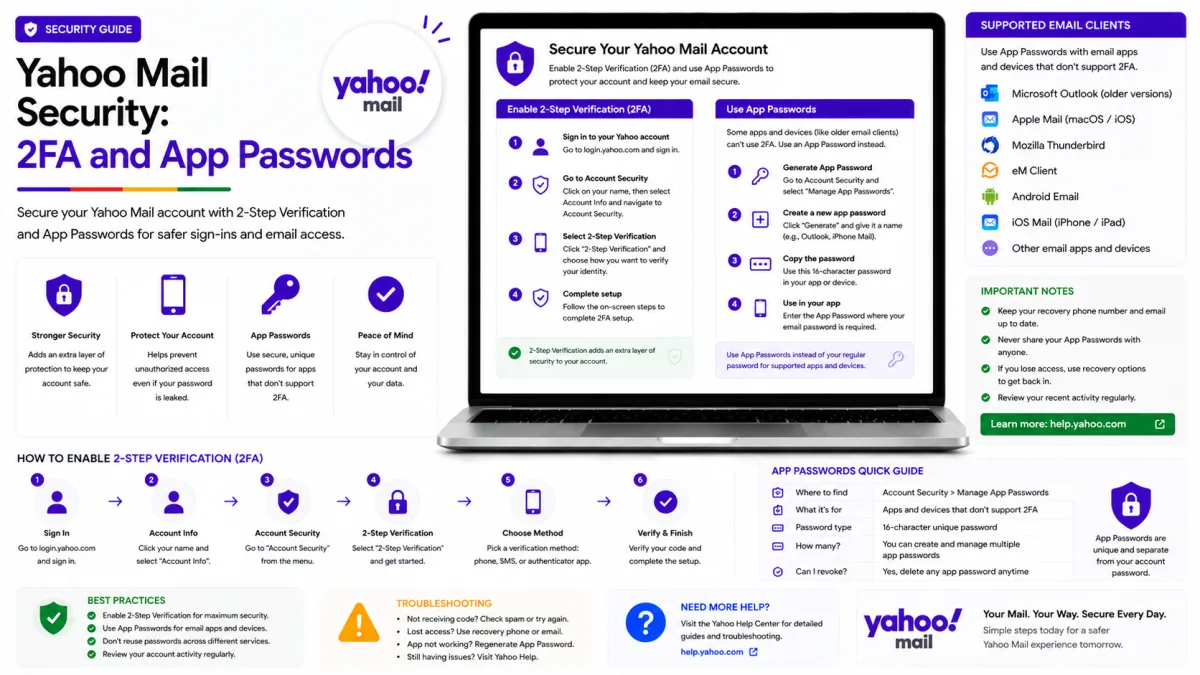
Yahoo gives you more security options than most providers, and they interact in ways that are not obvious. This guide covers two-step verification, app passwords for mail clients, and the specific reasons an option you are looking for may not appear at all.
Yahoo supports browser-based authentication for current applications and app passwords for older or manually configured connections. When a mail application offers Yahoo or “Sign in with Yahoo,” use that supported sign-in process first.
An app password may be required when an application cannot open Yahoo’s sign-in page, or when Account Key or two-step verification is enabled. It is not automatically required for every installation of Outlook, Apple Mail or Thunderbird.
Two-step verification
Two-step verification asks for a code, in addition to your password, whenever you sign in from a device or browser Yahoo does not recognise. Someone who learns your password still cannot get in.
Sign in and open your Account Security page.
Under Ways of signing in, select 2-step verification.
Choose your verification method.
Follow the prompts to finish.
The four methods
Text message — a code sent to your phone. Simplest, and the weakest: numbers can be taken over and messages intercepted.
Authenticator app — codes generated on your device by Google Authenticator, Microsoft Authenticator, Authy or similar. Works offline. A strong default.
Push notification — an approval sent to any Yahoo app on your phone. Convenient if you have one installed.
Security key — a physical device you plug in or tap. The strongest option available.
If the authenticator option is missing
This catches people out and the reason is documented but easy to miss: Yahoo only offers the authenticator app method once you have at least two recovery methods on your account.
If it is not showing, add a recovery phone number and a recovery email address first, then return to the two-step verification screen. The option appears once both are present.
If two-step verification is missing entirely
Yahoo's own answer is that you have not created a password. An account signing in solely by Account Key has no password for a second step to be added to — set a password first, and the option appears.
Save your emergency recovery code
When you set up an authenticator app, Yahoo issues a separate emergency recovery code for use when the app is unavailable. Print it or write it down and keep it somewhere safe but reachable.
Storing it only on the phone that runs the authenticator defeats the purpose entirely. That code is what stands between "I lost my phone" and "I lost my account".
Account Key and two-step verification are alternatives
Yahoo treats these as mutually exclusive rather than as layers. If you currently sign in with Account Key — approving a notification instead of typing a password — you must disable it before two-step verification can be switched on.
It is worth choosing deliberately. Account Key is more convenient day to day; two-step verification is more robust, particularly with an authenticator app or a security key, and it works even when you have no Yahoo app installed.
App passwords
An app password is a 16-character code that lets one specific application into your account without using your real password.
When you need one
Use Yahoo’s normal browser-based sign-in whenever an application offers Yahoo or “Sign in with Yahoo.”
You may need an app password when:
Yahoo Account Key is enabled.
Two-step verification is enabled.
An older application cannot open Yahoo’s sign-in page.
A printer, scanner, script or other device supports only manual username-and-password authentication.
A manually configured mail client repeatedly rejects the normal account password.
You normally do not need an app password for the Yahoo Mail app itself. Current applications that complete Yahoo’s official browser-based sign-in may also work without one.
Creating an app password
Create a separate app password for each application or device that genuinely requires one:
Sign in to Yahoo Account Security.
Under External connections, select Create app password.
Enter a name identifying the application or device.
Select Generate password.
Paste the generated code into that application’s password field.
Use a clear name such as “Thunderbird laptop” or “office scanner.” The code is shown once; if you lose it, delete the entry and generate another.
Delete an app password whenever you stop using an application or lose, sell or replace a device. Removing the app password revokes that connection without requiring you to change your main Yahoo password.
What catches people out
Yahoo app passwords remain active even after you change your main Yahoo account password. Changing the main password does not automatically revoke them.
If you change your password because you suspect unauthorised access:
Open Yahoo Account Security.
Review External connections.
Delete app passwords you do not recognise.
Remove passwords belonging to devices or applications you no longer use.
Review current sign-ins and sign out unfamiliar devices.
Create one app password per application rather than reusing the same code. Treat every app password as sensitive account access and never share it with another person.
Security keys
A compatible physical security key can be used as a Yahoo two-step verification method. The key must work with your device and a current supported browser.
To protect against losing the key:
Keep another verified recovery method on the account.
Save any emergency recovery code Yahoo provides during setup.
Consider registering a backup security key if the account is especially important.
Remove a lost or stolen security key from Account Security as soon as possible.
If the key is unavailable, use the emergency recovery code or another verification method offered by Yahoo. Do not disable account security unless it is necessary to regain access.
Check your account activity
Worth doing occasionally, and immediately if anything feels wrong. Your Yahoo account security settings show recent activity, the apps connected to your account, and every method currently able to verify you.
Recent activity — look for sign-ins from places or devices you do not recognise.
Apps connected to your account — remove anything you no longer use.
App passwords — delete entries for devices you no longer own.
If you find something you do not recognise, change your password first, then remove the unfamiliar access. Doing it the other way round gives an intruder the chance to re-establish it.
The habits that matter
Keep two recovery methods current. Yahoo requires two before offering its better verification options, and recovery depends entirely on them.
Store your emergency recovery code away from your phone.
Never read a verification code aloud to anyone. No legitimate support process needs it — anyone asking is asking for your account.
Official Yahoo sources
Enquiries
Frequently asked questions
Why can't I select the authenticator app option?
Yahoo may require at least two verified recovery methods before offering authenticator-app verification. Add and verify a recovery phone number and recovery email address, then return to the two-step verification settings.
Why is there no option to turn on two-step verification?
Yahoo's own answer: you have not created a password yet. Accounts using Account Key alone have no password to add a second step to.
Can I use Account Key and two-step verification together?
No. Account Key must be turned off before two-step verification can be enabled.
Do I need an app password for the Yahoo Mail app?
No. Yahoo’s own Mail app uses Yahoo’s supported sign-in process. App passwords are mainly for older applications, manual mail configurations and devices that cannot complete Yahoo’s browser-based authentication, particularly when Account Key or two-step verification is enabled.
What happens to my app passwords if I change my Yahoo password?
They remain active. Yahoo says changing the main account password does not automatically invalidate app passwords. Review and manually delete them under External connections, especially if the password was changed because of suspicious activity.
Can I use Yahoo Account Key and two-step verification together?
No. Yahoo treats Account Key and two-step verification as alternative sign-in methods. Disable Account Key before enabling two-step verification.
Next delivery
Keep reading
Yahoo Mail Password Reset
How to Reset Your Yahoo Mail Password
Reset a forgotten Yahoo password with Sign-in Helper, understand recovery limitations, review app passwords and find the right route for provider-managed accounts.
5 min read
Yahoo Mail Troubleshooting
Yahoo Mail Not Working? Common Fixes
Fix Yahoo Mail problems involving missing messages, sending failures, storage, filters, Apple Mail, browser loading and device synchronisation.
7 min read
Yahoo Mail Login
How to Log In to Yahoo Mail
Sign in to Yahoo Mail on a computer, Android or iPhone, use Account Key and passkeys, and fix verification or mail-client authentication problems.
7 min read
Yahoo Mail Sign Up
How to Create a Yahoo Mail Account
Create a Yahoo Mail account, choose a permanent address, verify your mobile number, configure recovery and understand disposable addresses.
6 min read
Yahoo Mail IMAP
Yahoo Mail IMAP Settings
Use Yahoo Mail IMAP in Outlook, Apple Mail or Thunderbird with the correct server, port, encryption and supported authentication method.
6 min read
Yahoo Mail SMTP
Yahoo Mail SMTP Settings
Use Yahoo Mail SMTP with the correct server, ports, encryption and authentication, and fix sending problems in clients, printers and scripts.
6 min read