Yahoo Mail Not Working? Common Fixes
Fix Yahoo Mail problems involving missing messages, sending failures, storage, filters, Apple Mail, browser loading and device synchronisation.
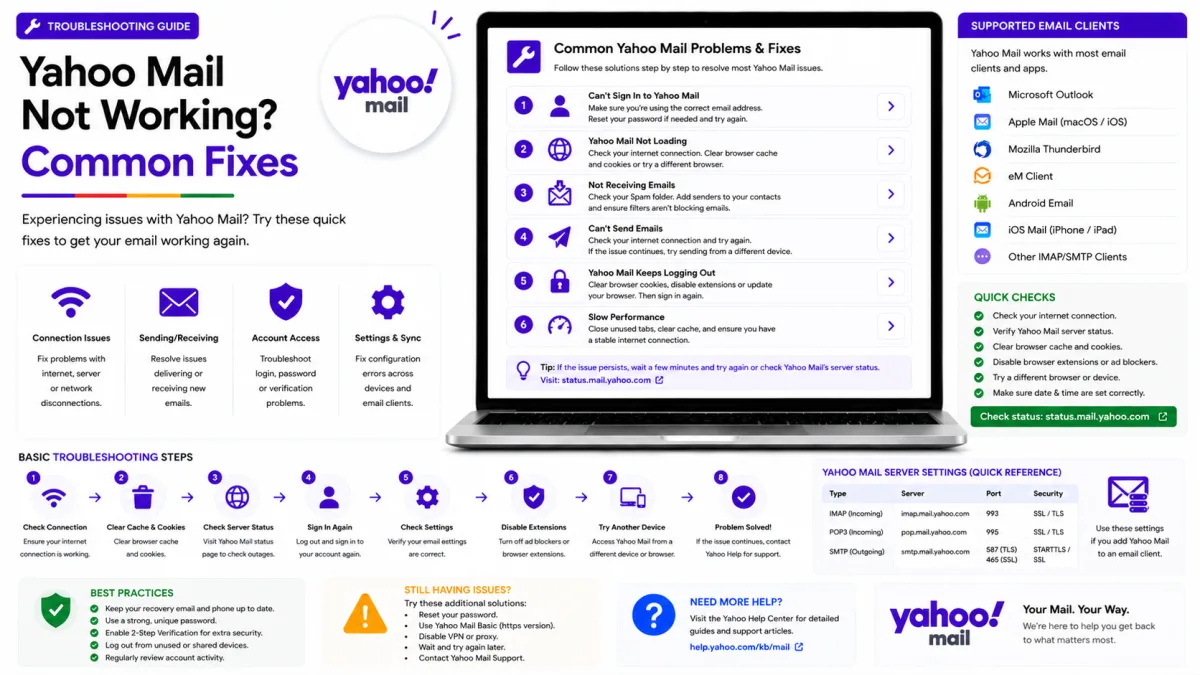
Server settings
Yahoo Mail
- IMAP incoming SSL/TLS
- SMTP outgoing SSL/TLS
- POP3 download SSL/TLS
imap.mail.yahoo.com
port 993
smtp.mail.yahoo.com
port 465
pop.mail.yahoo.com
port 995
- App password
- May be required for older or manually configured apps, Account Key and two-step verification
- Alt SMTP port
- 587 with STARTTLS
Yahoo Mail problems usually affect one of four areas: receiving messages, sending messages, synchronising one device or loading Yahoo Mail itself. Start by identifying whether the problem affects every device or only one application, then work through the relevant checks below.
Mail is not arriving
Start with storage
A Yahoo account that reaches its storage limit may stop sending and receiving messages. Yahoo substantially reduced the free allowance for many accounts during 2025, so an older mailbox can now be over its limit even if it previously had plenty of space.
The allowance can vary by account and region. Yahoo’s US documentation currently lists 20 GB of free storage, while Yahoo’s UK documentation lists 15 GB. Check the amount displayed inside your own account rather than assuming every Yahoo account has the same limit.
To check storage:
Open Yahoo Mail in a browser.
Look for the storage amount near your profile icon or account information.
In some Yahoo Mail layouts, open Settings → More Settings to find the storage information.
If the account is full:
Search for and delete messages with large attachments.
Empty Trash after deleting messages.
Review Spam and empty it if necessary.
Download important attachments before deleting the messages.
Consider a paid storage plan if clearing enough space is not practical.
Messages in Trash and Spam can continue using storage until those folders are emptied. After clearing space, allow Yahoo some time to update the displayed amount and resume normal mail delivery.
Check filters
Filters run before you see a message and can move it to a folder, or delete it outright. A rule written years ago for one newsletter can quietly swallow anything matching a pattern you have long since forgotten.
Open Settings → More Settings → Filters and read every rule, particularly any that move mail out of the inbox or delete it.
Check blocked addresses
Open Yahoo Mail’s Security and Privacy settings and review the blocked-address list. Remove any sender who was blocked accidentally.
If a legitimate message is in Spam, select it and mark it as Not Spam. You can also add important senders to your Yahoo Contacts. Yahoo does not provide a universal “safe sender” switch, so avoid telling readers to mark an address as safe.
Check forwarding
Review Yahoo Mail’s forwarding settings if messages appear to arrive and then disappear. If forwarding is enabled, confirm that the destination address belongs to you and that Yahoo is keeping a copy when that is what you want.
Forwarding availability can depend on the Yahoo Mail version, plan and region. If you did not enable it, remove the forwarding address, change your password and review recent account activity.
Check Spam, and check the right mailbox
Before concluding a message never arrived, look in Spam and Trash. If you have several Yahoo addresses or disposable addresses, also confirm you are looking at the right one — mail sent to a disposable address arrives in the main inbox, but a filter may have moved it somewhere you are not looking.
Mail will not send
Sending and receiving are separate, so one can fail while the other works.
Check storage again. A full account blocks sending as well as receiving.
In a mail application, first confirm that the account was added using Yahoo or “Sign in with Yahoo.” If the application uses manual authentication, Yahoo Account Key or two-step verification may require an app password. Older applications that cannot open Yahoo’s sign-in page may also need one.
Check the attachment size. A message stuck in the outbox is sometimes simply too large.
Check for a temporary limit. Yahoo caps sending volume to contain compromised accounts, and hitting it produces a block that clears on its own.
One device is not syncing
On the Yahoo Mail app
Update the app first — an outdated version failing authentication looks exactly like a sync problem. Then check that the account is not paused in the app's settings, and pull down to refresh manually.
On iPhone’s built-in Mail app
On recent iOS versions, open Settings → Apps → Mail → Mail Accounts and select the Yahoo account. Confirm that Mail is enabled.
If the account still does not synchronise:
Update iOS.
Remove the affected Yahoo account from Apple Mail.
Add it again through Settings → Apps → Mail → Mail Accounts → Add Account → Yahoo.
Complete Yahoo’s browser-based sign-in process.
Choose Yahoo rather than “Other” whenever the Yahoo option is available. Use a manual configuration and app password only when the supported Yahoo sign-in cannot be completed.
On any device, when nothing else helps
Remove and reconnect only the affected application first:
Update the application and operating system.
Remove the Yahoo account from that application.
Review External connections in Yahoo Account Security.
Remove the connection associated with the affected application.
Add the account again using Yahoo’s supported sign-in process.
If manual authentication is necessary, generate a new app password for that application.
Do not remove every connected application as a routine troubleshooting step. Revoke all connections only if you suspect unauthorised access, because every trusted mail client will then require setup again.
Yahoo Mail is slow, blank or will not load
Try Yahoo Mail in a private or incognito window.
If it works privately, the problem is probably local to the normal browser profile:
Clear Yahoo cookies and cached site data.
Temporarily disable browser extensions.
Update the browser.
Check whether a privacy or content-blocking extension is interfering with Yahoo Mail.
If it fails in private browsing as well:
Try another current browser.
Try another device.
Try another network.
Confirm that the device’s date and time are correct.
Check whether other Yahoo services are also unavailable.
If Yahoo Mail works on other devices, concentrate on the affected browser or application. If it fails everywhere, investigate the account, storage or a temporary Yahoo service problem.
Beware of fake Yahoo support numbers
Yahoo may offer paid support in certain regions and for certain products. Always begin at Yahoo’s official Help website to see which support options are available for your account.
Do not trust a number merely because it appears prominently in a search result, forum, social-media post, advertisement or uploaded document.
A fraudulent support agent may ask you to:
Read out a Yahoo verification code.
Install remote-access software.
Pay through gift cards, cryptocurrency or an unrelated payment service.
Share your password or app password.
Never disclose a Yahoo verification code or password to another person. Open Yahoo Help directly and use only the contact options presented there.
Narrowing it down
Answer these questions before changing settings:
Does the problem affect every device or only one? One affected device normally points to that application, its connection or its authentication.
Can you send but not receive, or receive but not send? A one-sided failure helps separate incoming, outgoing and account-level problems.
Does the problem affect one sender or everyone? One sender suggests Spam, a block or a filter. Every sender suggests storage, forwarding or a wider account problem.
Did the problem begin after changing the password, enabling Account Key or turning on two-step verification? The affected application may need to authenticate again.
Does Yahoo Mail work in a private browser window? If it does, clear cookies or investigate browser extensions.
Use the answers to choose the relevant section rather than applying every fix at once.
Official Yahoo sources
Enquiries
Frequently asked questions
Why has Yahoo Mail stopped receiving emails?
Check the account’s storage, Spam folder, filters, blocked addresses and forwarding settings. If only one device is affected, remove and reconnect the Yahoo account through the application’s supported Yahoo sign-in process.
How much free storage does Yahoo Mail give?
The amount can vary by account and region. Yahoo’s US documentation currently lists 20 GB for a standard free account, while Yahoo UK lists 15 GB. Check the storage amount displayed inside your own Yahoo account.
Does Yahoo have a support phone number?
Yahoo may offer paid support in certain regions and for certain products. Start at Yahoo’s official Help website and use only the support options shown there. Never disclose a password or verification code to someone who contacts you.
Why is Yahoo not syncing on my phone?
Update the phone and mail application, then remove and add the account again using Yahoo or “Sign in with Yahoo.” A manually configured or older application may require an app password when Account Key or two-step verification is enabled.
Next delivery
Keep reading
Yahoo Mail Security
Yahoo Mail Security: 2FA and App Passwords
Secure Yahoo Mail with two-step verification, Account Key, security keys and app passwords for older or manually configured applications.
6 min read
Yahoo Mail Password Reset
How to Reset Your Yahoo Mail Password
Reset a forgotten Yahoo password with Sign-in Helper, understand recovery limitations, review app passwords and find the right route for provider-managed accounts.
5 min read
Yahoo Mail Login
How to Log In to Yahoo Mail
Sign in to Yahoo Mail on a computer, Android or iPhone, use Account Key and passkeys, and fix verification or mail-client authentication problems.
7 min read
Yahoo Mail Sign Up
How to Create a Yahoo Mail Account
Create a Yahoo Mail account, choose a permanent address, verify your mobile number, configure recovery and understand disposable addresses.
6 min read
Yahoo Mail IMAP
Yahoo Mail IMAP Settings
Use Yahoo Mail IMAP in Outlook, Apple Mail or Thunderbird with the correct server, port, encryption and supported authentication method.
6 min read
Yahoo Mail SMTP
Yahoo Mail SMTP Settings
Use Yahoo Mail SMTP with the correct server, ports, encryption and authentication, and fix sending problems in clients, printers and scripts.
6 min read