Yahoo Mail Server Settings: IMAP, SMTP and POP3
Find Yahoo Mail IMAP, SMTP and POP3 servers, ports, encryption and authentication settings in one concise reference.
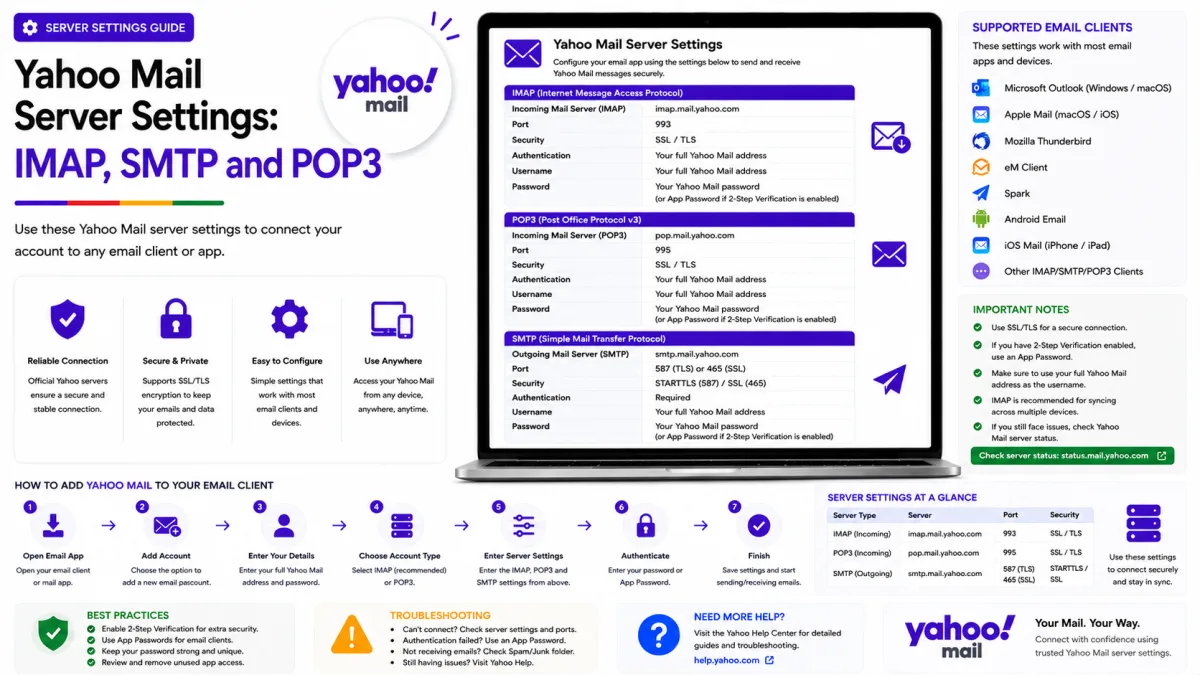
Server settings
Yahoo Mail
- IMAP incoming SSL/TLS
- SMTP outgoing SSL/TLS
- POP3 download SSL/TLS
imap.mail.yahoo.com
port 993
smtp.mail.yahoo.com
port 465
pop.mail.yahoo.com
port 995
- App password
- May be required for older or manually configured apps, Account Key and two-step verification
- Alt SMTP port
- 587 with STARTTLS
Everything needed to connect Yahoo Mail to a mail client, in one place. Yahoo is more straightforward than some providers here — the settings are stable and well documented — but there is one requirement that stops most setups dead, and it is worth knowing before you start rather than after three failed attempts.
Protocol | Server | Port | Encryption |
|---|---|---|---|
IMAP — incoming |
| 993 | SSL/TLS |
SMTP — outgoing |
| 465 | SSL/TLS |
SMTP — outgoing alternative |
| 587 | STARTTLS |
POP3 — incoming |
| 995 | SSL/TLS |
Your username is your complete Yahoo email address, including the domain.
Outgoing SMTP authentication is required. When a mail application offers Yahoo or “Sign in with Yahoo,” use that supported sign-in process. Older and manually configured applications may require an app password, particularly when Account Key or two-step verification is enabled.
Yahoo Mail server settings
Your username is your full email address, including the domain. Authentication is required on the outgoing server as well as the incoming one — if your client has a separate checkbox for that, tick it.
Choose the correct authentication method
Current mail applications may support Yahoo’s browser-based authentication. Choose Yahoo or “Sign in with Yahoo” whenever that option is available and complete the Yahoo sign-in page that opens.
An app password may be required when:
Yahoo Account Key is enabled.
Two-step verification is enabled.
An older application cannot open Yahoo’s sign-in page.
A printer, scanner or script supports only manual authentication.
A manually configured mail client rejects the normal account password.
To create one, open Yahoo Account Security, find External connections and select Create app password. Name it after the application or device and enter the generated code into that application’s password field.
The code is shown once. Remove any spaces accidentally copied with it. If the code is lost, delete the entry and create another.
Yahoo app passwords remain active after the main Yahoo password changes. Revoke them manually when an application or device is no longer trusted.
IMAP or POP3?
Choose IMAP for most accounts.
IMAP keeps messages on Yahoo’s servers and synchronises the mailbox across devices. Reading, moving or deleting a message in one connected application is reflected on the other connected devices.
POP3 primarily downloads messages to one application. It does not provide the same two-way folder and read-status synchronisation as IMAP.
Whether POP3 leaves or deletes the server copy depends on the selected Yahoo and mail-client settings. Do not assume that POP3 always deletes messages by default. Review the “keep email on server” setting before downloading an important mailbox.
Use POP3 only when you specifically need a local-download workflow. For phones, tablets and computers sharing the same mailbox, use IMAP.
Choosing a port
Use the port and encryption method as a matching pair:
IMAP: port 993 with SSL/TLS.
POP3: port 995 with SSL/TLS.
SMTP: port 465 with SSL/TLS.
SMTP alternative: port 587 with STARTTLS.
Do not select SSL/TLS for port 587 if the application specifically distinguishes it from STARTTLS. Similarly, do not select STARTTLS for port 465.
If one supported SMTP port is blocked by the application or network, try the other with its matching encryption method.
Always use encryption
Do not configure Yahoo Mail with an unencrypted connection. Encryption protects the account credentials and message data while they travel between the application and Yahoo’s servers.
Avoid old unencrypted settings such as POP3 port 110. Port 25 is primarily intended for server-to-server delivery and is often blocked on consumer, workplace and public networks.
For Yahoo Mail clients, use only the encrypted ports documented above.
If it will not connect
Check these items:
Choose Yahoo or “Sign in with Yahoo” if the application offers it.
Enter your complete Yahoo email address as the username.
Confirm that the server address is correct.
Match each port with the correct encryption method.
Confirm that outgoing SMTP authentication is enabled.
If Account Key or two-step verification is enabled and the application uses manual authentication, try an app password.
Remove spaces accidentally copied with the app password.
Update the mail application and operating system.
Try another supported SMTP port if only outgoing mail fails.
Try another network if the connection times out.
Yahoo Mail does not normally require a separate switch to enable IMAP. Avoid changing unrelated mailbox settings when the likely problem is authentication, an incorrect port or an outdated application.
If the account connects but messages are missing, check the application’s synchronisation range, Yahoo storage, filters, Spam and blocked addresses.
One last thing to check if nothing else has worked: some sources suggest IMAP access may need switching on...
If the client connects but mail is not arriving at all, that is a different problem. Our troubleshooting guide covers storage, filters and blocked senders, which between them explain most missing mail.
Official Yahoo sources
Enquiries
Frequently asked questions
What are the Yahoo Mail IMAP settings?
Use imap.mail.yahoo.com on port 993 with SSL/TLS. Enter your complete Yahoo email address as the username and use Yahoo’s supported sign-in process when available.
Why won't Yahoo accept my password in my mail client?
First choose Yahoo or “Sign in with Yahoo” if the application offers it. An older or manually configured application may require an app password, particularly when Account Key or two-step verification is enabled.
Should I use port 465 or 587 for Yahoo SMTP?
Both are supported. Use port 465 with SSL/TLS or port 587 with STARTTLS. Keep the port and encryption method correctly matched.
Does Yahoo support POP3?
Yes. Use pop.mail.yahoo.com on port 995 with SSL/TLS. The option to keep or delete the server copy depends on the selected POP settings. IMAP is generally better for accounts used on multiple devices.
Do app passwords stop working when I change my Yahoo password?
No. Yahoo says app passwords remain active after the main password changes. Review and manually delete app passwords under External connections when an application or device should no longer have access.
Next delivery
Keep reading
Yahoo Mail Security
Yahoo Mail Security: 2FA and App Passwords
Secure Yahoo Mail with two-step verification, Account Key, security keys and app passwords for older or manually configured applications.
6 min read
Yahoo Mail Password Reset
How to Reset Your Yahoo Mail Password
Reset a forgotten Yahoo password with Sign-in Helper, understand recovery limitations, review app passwords and find the right route for provider-managed accounts.
5 min read
Yahoo Mail Troubleshooting
Yahoo Mail Not Working? Common Fixes
Fix Yahoo Mail problems involving missing messages, sending failures, storage, filters, Apple Mail, browser loading and device synchronisation.
7 min read
Yahoo Mail Login
How to Log In to Yahoo Mail
Sign in to Yahoo Mail on a computer, Android or iPhone, use Account Key and passkeys, and fix verification or mail-client authentication problems.
7 min read
Yahoo Mail Sign Up
How to Create a Yahoo Mail Account
Create a Yahoo Mail account, choose a permanent address, verify your mobile number, configure recovery and understand disposable addresses.
6 min read
Yahoo Mail IMAP
Yahoo Mail IMAP Settings
Use Yahoo Mail IMAP in Outlook, Apple Mail or Thunderbird with the correct server, port, encryption and supported authentication method.
6 min read