GMX Server Settings: IMAP, SMTP and POP3
Every GMX server setting in one place — plus the switch you must turn on first, and why GMX may turn it back off without telling you.
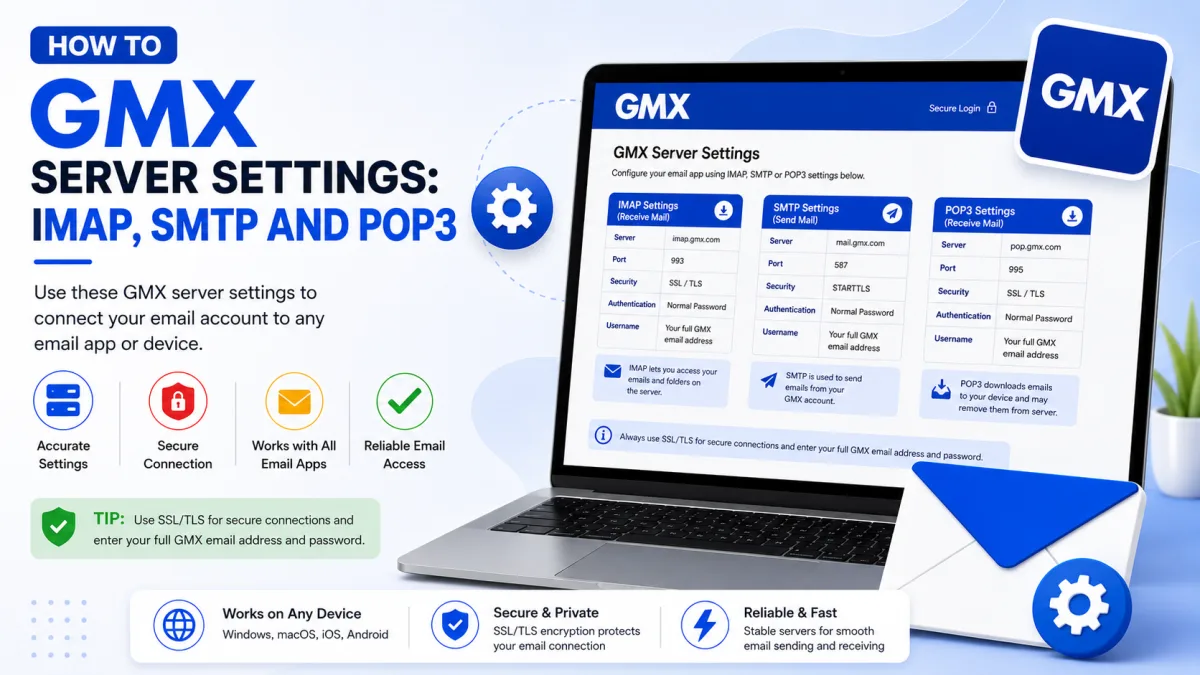
Server settings
GMX
- IMAP incoming SSL/TLS
- SMTP outgoing STARTTLS
- POP3 download SSL/TLS
imap.gmx.com
port 993
mail.gmx.com
port 587
pop.gmx.com
port 995
- Username
- Full GMX email address
- SMTP authentication
- Required
- Protocol access
- Enable POP3/IMAP in GMX settings first
- Authentication with 2FA
- Use an application-specific password
- Alternative SMTP
- Port 465 with SSL/TLS
- Supported TLS
- TLS 1.2 or 1.3
Everything needed to connect GMX to a mail client, in one place. GMX is unusual in one important respect: correct settings alone are not enough. There is a switch you have to turn on first — and GMX may turn it back off later without telling you.
Turn on external access first
GMX deactivates POP3 and IMAP by default. Until you enable it, no mail program can connect no matter how correct your settings and password are, and the error you get says "authentication failed" — which sends almost everyone hunting for a password problem that does not exist.
Sign in to GMX in a browser.
Open the Email tab and click Settings.
Click POP3 & IMAP.
Tick Enable access to this account via POP3 and IMAP.
Click Save.
GMX may switch it off again
This is the part worth remembering, because it explains a failure that otherwise makes no sense.
GMX states that this setting is turned off automatically, for security reasons, if you do not use POP3 or IMAP for a longer period.
So a setup that worked perfectly for months can simply stop, with nothing changed at either end and no notification. The symptom is an authentication error from a mail program whose settings are still entirely correct.
If that describes your situation — it worked, nothing changed, now it does not — check this switch before touching anything else. Re-ticking it is often the whole fix.
GMX server settings
Protocol | Server | Port | Encryption |
|---|---|---|---|
IMAP (incoming) |
| 993 | SSL |
POP3 (incoming) |
| 995 | SSL |
SMTP (outgoing) |
| 587 | STARTTLS |
Your username is your full email address. Authentication is required on the outgoing server as well as the incoming one.
Port 465 with SSL also works for outgoing mail, and is worth trying if 587 will not connect — some networks block one and not the other.
German gmx.net accounts
If your address ends in gmx.net rather than gmx.com, use the gmx.net hostnames instead — imap.gmx.net and mail.gmx.net. Same service, different servers, and using the wrong pair produces a failure that looks exactly like wrong credentials.
If your program does not offer STARTTLS
GMX's own guidance: if STARTTLS is not available, use TLS. If neither option exists, simply activating the program's "Encryption" option is sufficient.
One firm requirement: your program must support TLS 1.2 or 1.3. GMX no longer supports the older 1.0 and 1.1 for security reasons. A program too old to speak the newer versions cannot connect at all — and it will report that as a credentials failure rather than a protocol one.
IMAP or POP3?
Choose IMAP unless you have a specific reason not to.
IMAP synchronises. Your mail stays on GMX's servers and every device sees the same mailbox — read something on your phone and it shows as read on your laptop, move it to a folder and it moves everywhere.
POP3 downloads, and by default removes the server copy. That suits one narrow case — archiving mail permanently onto a single machine — and causes lasting confusion on any account used from more than one device.
There is also a GMX-specific reason to prefer IMAP, or at least to keep server copies when using POP3. GMX’s personal spam filter can be trained through GMX webmail and the official GMX Mail app, but not through third-party clients such as Outlook or Thunderbird.
If POP3 downloads and removes a misfiled message from the server, it will no longer be available in GMX’s official interfaces for correction. Configure the program to leave copies on the server so you can mark messages as Spam or Not Spam through GMX webmail or the official GMX Mail app.
Two things to configure in your program
Folder mapping
Many email programs cannot correctly match their own folders to GMX's system folders — a program's "Trash" may not line up with what GMX calls it — so the program creates its own instead, and your mailbox sprouts duplicates.
Set the mapping manually in your program's account settings so Sent, Drafts, Trash and Spam point at GMX's existing folders. Doing it once at setup avoids a mess that gets harder to untangle later.
Outgoing authentication
Tick "my outgoing server requires authentication" if your program has that option. GMX no longer supports the old SMTP-after-POP method, which allowed sending without authenticating — so a program relying on it will receive mail perfectly and fail to send.
If two-factor authentication is on
Your normal GMX password will not work in an external mail program after two-factor authentication is enabled. Create an application-specific password and use it for the mail account. GMX does not document a requirement for separate passwords for IMAP and SMTP.
A separate application-specific password may be needed when connecting another application or a different service, such as GMX Calendar or Contacts. See our GMX Security guide for setup instructions.
Sending limits
GMX uses automated anti-spam controls and does not publish one fixed sending threshold. Bulk or suspicious sending can cause messages to be rejected or the account to be blocked.
If GMX displays a warning or block, stop repeatedly retrying and sign in through GMX webmail to read the complete message and follow its instructions. Use a dedicated email-delivery service for newsletters, automated alerts or website-generated messages instead of a personal GMX mailbox.
If it still will not connect
Is external access enabled? And has it been switched off automatically since you last used it?
Right hostnames for your domain? gmx.com and gmx.net use different servers.
Port and encryption matched? 993 with SSL, 995 with SSL, 587 with STARTTLS, 465 with SSL.
Username is the full address? Not just the part before the @.
App password, if 2FA is on? Your normal password will be refused.
Program supports TLS 1.2 or 1.3? Older software cannot connect at all.
Security software interfering? Antivirus and firewall mail scanning can block the connection silently.
And GMX's own best advice when an error makes no sense: sign in on the website on a computer. Some errors, such as temporary blocks, cannot be displayed properly by a mail program — the real message and its instructions appear there.
Checked against the source
Official sources
- GMX Help Center — Problems setting up GMX in my email program ↗
- GMX Help Center — Activate or deactivate POP3 and IMAP ↗
- GMX Help Center — Third party email applications ↗
- GMX Help Center — Using the IMAP protocol ↗
- GMX Help Center — Setting Up Outlook (POP3) ↗
- GMX Help Center — System Folders ↗
- GMX Help Center — Email fields and recipient limits ↗
- GMX Help Center — Why is my account blocked? ↗
Enquiries
Frequently asked questions
Why did my GMX mail program stop working on its own?
GMX switches POP3/IMAP access off automatically if it goes unused for a long period. Re-enable it in Email → Settings → POP3 & IMAP.
What are the GMX IMAP settings?
imap.gmx.com port 993 with SSL, and mail.gmx.com port 587 with STARTTLS for outgoing.
Why does GMX say authentication failed when my password is right?
POP3/IMAP access is off by default. No password works until you enable it in your GMX settings.
Can I use port 465 for GMX outgoing mail?
Yes. GMX documents port 465 with SSL as an alternative to 587 with STARTTLS.
Do gmx.net accounts use different servers?
Yes. German gmx.net accounts use gmx.net hostnames rather than gmx.com.
Next delivery
Keep reading
GMX Troubleshooting
GMX Not Working? Common Fixes
Why GMX stops receiving mail, refuses to send, or keeps misfiling the same sender — including the rule ordering that makes marking spam do nothing.
7 min read
GMX Security
GMX Security: 2FA and App Passwords
Turn on GMX two-factor authentication, create application-specific passwords for mail programs, and understand why one password may not be enough.
5 min read
GMX Password Reset
How to Reset Your GMX Password
Reset a forgotten GMX password — check your browser first, understand why the recovery options may not appear, and what two-factor authentication requires.
5 min read
GMX Sign Up
How to Create a GMX Account
Create a free GMX address step by step — and what to do about the country restriction, the IP block, and the VPN mistake that gets new accounts suspended.
5 min read
GMX Login
How to Log In to GMX
Sign in to GMX on any device, tell gmx.com and gmx.net apart, and work out what is wrong when a mail app fails but the website works.
6 min read
GMX IMAP
GMX IMAP Settings
GMX's incoming server, port and encryption — plus the switch you must enable first, and why GMX may turn it off again on its own.
6 min read